Settings
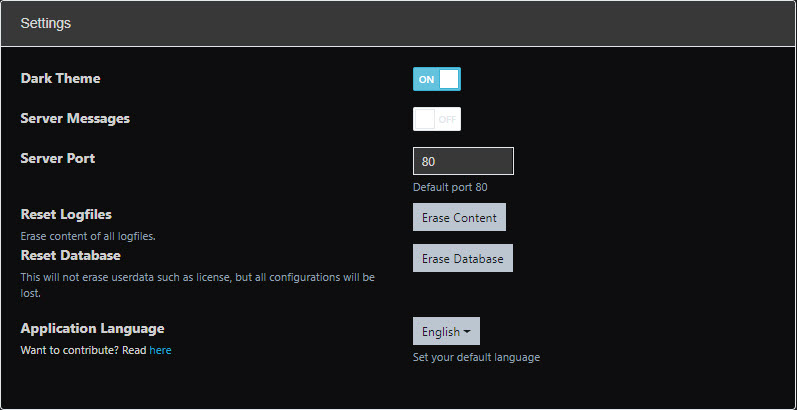
Dark Theme
Dark mode can be enabled from the settings page.
Server messages
This will allow UAVcast to populate a notification card when server notice an error.
Messages:
- Power (undervoltage detection)
- CPU throttling due to undervoltage or high load.
Server Port
You are able to change the access port for UAVcast-Pro from the default port of 80.
Reset Logfiles
Each function in UAVcast stores all operations to logfiles, and to start on a fresh file you can reset them here.
Reset Database
Delete all configuration you have made in UAVcast-Pro. User data will NOT be deleted!
Alternate Languages
Select a prefered lanuage.
- English
- Simplified Chinese
- Turkish
- Spanish
- Russian
- Polish
- Dutch
- Italien
- Portuguese
If you would like to contribute to UAVcast-Pro by adding a new language, please follow the instructions here.
Updates
UAVcast is regularly updated, to check if there are any updates available for your installation click the "Check for Update" button.
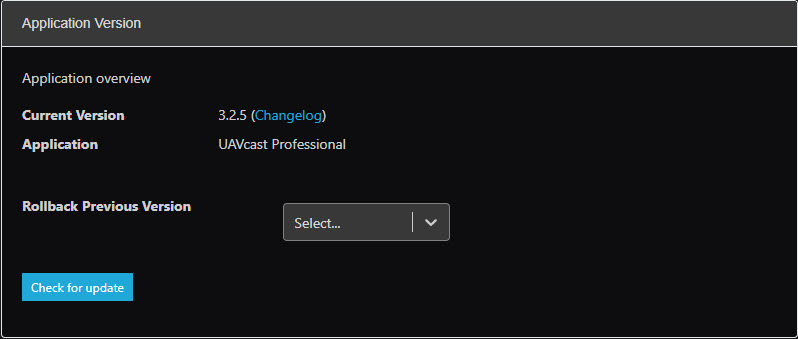
Once an update has been completed - please refresh your browser.